
Publikováno: čvn 17, 2026 - 80 Zobrazení

Android Customization Projector UI: B2B OEM Guide
Android customization is where most private-label projector brands differentiate their user experience. The hardware inside a smart projector is largely commoditized — what makes a buyer pick yours over a competitor's is the customized Android projector UI: the boot logo, the launcher, the default apps, and the multi-language support. This guide explains what to customize, what to leave alone, and how to spec custom firmware for OEM projector buyers.
The Android Customization Stack
A customized Android projector has multiple customization layers:
Layer 1: Boot Logo / Splash Screen
- 2–5 second animation on power-on
- Brand logo + tagline
- Replaces the factory default splash
- Standard customization, low cost
Layer 2: Boot Animation
- Longer animation played after boot logo
- 5–15 seconds typical
- Brand-themed visuals and music
- Optional but recommended for premium
Layer 3: Default Wallpaper
- Home screen wallpaper
- Brand image or product photo
- Set as default during setup
Layer 4: Launcher / Home Screen
- Custom layout (apps, recommendations, search)
- Replaces Android TV launcher or adds on top
- Significant customization investment
Layer 5: Default Apps
- Pre-installed apps (your streaming partner, your retailer's QR code)
- Pinned app recommendations
- Custom app store integration
Layer 6: System Settings
- Default language, region, WiFi behavior
- Branded settings menu
- Custom firmware update server
Layer 7: Voice Assistant
- Custom wake word (rare, expensive)
- Custom voice responses
- Custom skill integration
Layer 8: OTA Update Channel
- Firmware updates come from your branded server
- Not the factory's default channel
- Requires OTA infrastructure
Cost by Customization Layer

Buyers looking for a turnkey smart OS reference should evaluate the GP95-GTV 400 ANSI Full-Sealed Smart Projector with Google TV Built-In. Google TV is licensed and pre-integrated, eliminating months of middleware work for ODM projects.
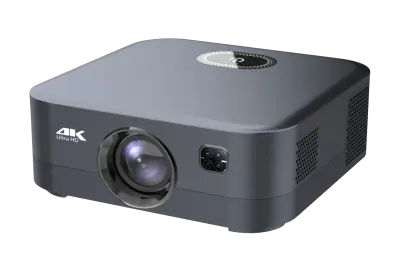
Distributors evaluating the B2B projector market can reference our GP94B 500ANSI Smart Projector for Hotels with Android 9—a production-validated platform covering 500 ANSI · Hotel-grade Android 9, suitable as an OEM/ODM starting point.
| Layer | One-Time Cost | Lead Time |
|---|---|---|
| Boot logo | $1,500–$3,000 | 7–14 days |
| Boot animation | $2,000–$5,000 | 7–14 days |
| Default wallpaper | $500–$1,500 | 3–7 days |
| Launcher customization | $5,000–$15,000 | 21–45 days |
| Default apps | $2,000–$8,000 (per app) | 14–30 days |
| System settings | $1,500–$4,000 | 7–14 days |
| Voice assistant | $5,000–$20,000 | 30–60 days |
| OTA infrastructure | $3,000–$10,000 (setup) + $1,000–$3,000/month | 30–60 days |
GMS vs AOSP Considerations
Customization depth depends on GMS or AOSP:
GMS-Certified Android
- Limited customization (must pass CTS / GTS)
- Launcher can be customized within GMS rules
- Default apps cannot replace Google apps
- Boot logo and animation: free to customize
AOSP Android
- Full customization freedom
- No Google compatibility restrictions
- Custom launcher, custom apps, custom everything
- No Google Play Store (typically sideloaded apps)
The Launcher Customization Decision
The launcher is the most visible customization. Three approaches:
1. Use Android TV Launcher as Is
- Minimal customization
- Fastest time to market
- Lowest cost
2. Theme Android TV Launcher
- Modify colors, fonts, wallpaper
- Custom app categories
- Branded look without full replacement
- Moderate cost ($5,000–$10,000)
3. Custom Launcher
- Build your own from scratch or fork Android TV launcher
- Full control over UX
- Highest cost ($15,000–$40,000)
- Risk: CTS/GTS compliance if GMS certified
Multi-Language Support
Multi-language UI for international sales:
| Languages | Implementation Cost | Lead Time |
|---|---|---|
| 1 language (English) | Included | — |
| 2 languages | $1,500–$3,000 | 14–21 days |
| 4 languages | $3,000–$6,000 | 21–35 days |
| 8 languages | $6,000–$12,000 | 35–60 days |
| 20+ languages | $15,000–$30,000 | 60–90 days |
- EU: English, German, French, Spanish, Italian, Polish, Dutch, Portuguese
- APAC: English, Chinese, Japanese, Korean, Thai, Vietnamese
- LATAM: Spanish, Portuguese
Default Apps and Pre-Installation
Pre-installed apps for OEM buyers:
| App Type | Examples | Cost |
|---|---|---|
| Streaming (with license) | Netflix, Disney+, Prime Video | $1–$5 per app per unit |
| Streaming (sideload) | Various regional apps | $0.50–$2 per app |
| Retailer / brand | Your retailer's app | $1,000–$5,000 setup |
| Custom utility | Setup wizard, support contact | $1,500–$4,000 setup |
| OEM brand app | Your content, promotions | $1,500–$4,000 setup |
The Boot Logo Best Practices
For maximum impact:
- Duration: 2–4 seconds (longer feels slow)
- Resolution: 1080p or 4K native (no letterboxing)
- Format: MP4 with H.264 or APNG
- Audio: optional 1-second sting
- Last frame: matches launcher (no jarring cut)
- Longer than 5 seconds
- Loud colors that fight the launcher
- Auto-play video (consumers prefer instant-on)
- Frame drops (looks unprofessional)
OTA Update Infrastructure
Custom OTA infrastructure for branded projectors:
Option 1: Factory OTA Server
- Factory hosts firmware updates
- Your brand appears in update notifications
- Lower cost, less control
- Recommended for most OEM buyers
Option 2: Your Branded OTA Server
- You host firmware updates on your server
- Full control over update cadence and content
- Higher cost, more responsibility
- Required for premium enterprise deployments
Option 3: Third-Party OTA Service
- Services like Mender or Balena host updates
- Custom branding, professional infrastructure
- $500–$2,000/month
- Good for mid-volume OEM buyers
Voice Assistant Customization
Three levels of voice assistant customization:
1. Default Assistant (No Customization)
- Google Assistant (GMS) or Alexa (with SDK)
- Standard wake word
- No custom commands
2. Custom Commands
- Add brand-specific commands ("Open Netflix")
- Pre-configured skills/actions
- $3,000–$8,000 one-time
3. Custom Wake Word
- "Hey [Your Brand]" instead of "Hey Google"
- Requires extensive voice training
- $20,000–$50,000 one-time + licensing
Customization Workflow
A typical OEM customization engagement:
- Specification: define what to customize (boot logo, launcher, default apps)
- Asset creation: provide brand assets (logo, fonts, images)
- Factory implementation: factory engineers implement customization
- Sample review: review customized sample on actual hardware
- Iteration: refine based on feedback
- Approval: sign off on final customization
- Production: customization applied to production run
- OTA updates: maintain customization over product life
Customization Lock
Critical: lock the customization scope before production:
- Once firmware is finalized, changes are expensive
- Bug fixes require full firmware re-build
- Major changes require CTS/GTS re-test (GMS)
Common Customization Mistakes
Five pitfalls:
- Boot logo too long — 8 seconds feels sluggish
- Launcher breaks GMS compliance — CTS failure, product launch delayed
- Missing language — retailer in target country cannot sell
- Wrong default apps — sideloaded apps break, customer returns
- Customization not tested on real hardware — visual issues only seen on actual projector
How to Verify Customization
Before approving a customized sample:
- Test boot logo on actual projector (frame rate, audio sync)
- Navigate full launcher (every menu, every setting)
- Launch every pre-installed app
- Switch between languages
- Test OTA update (if available)
- Verify regulatory markings (CE, FCC, etc.) still visible
What We Recommend for Android Customization OEM
- Custom boot logo + themed launcher for most OEM buyers
- Multi-language UI for international sales (4–8 languages)
- Factory OTA server for most projects (lower cost, sufficient)
- Custom commands for voice assistant (not custom wake word)
- Lock customization scope at sample approval
- Test on real hardware before approval
Conclusion
Android customization is the most visible expression of your brand on a smart projector. Invest in boot logo, themed launcher, and multi-language UI. Lock the scope at sample approval. Plan for ongoing firmware updates over product life.
💼 Need Android customization service for your projector OEM?
Request a Free Quote | View Product Catalog
We provide full Android customization services: boot logo, themed launcher, multi-language UI, default apps, and OTA infrastructure. Engineering team will scope the customization within 24 hours.
