
Geplaatst op: mrt. 20, 2026 - 64 Weergaven
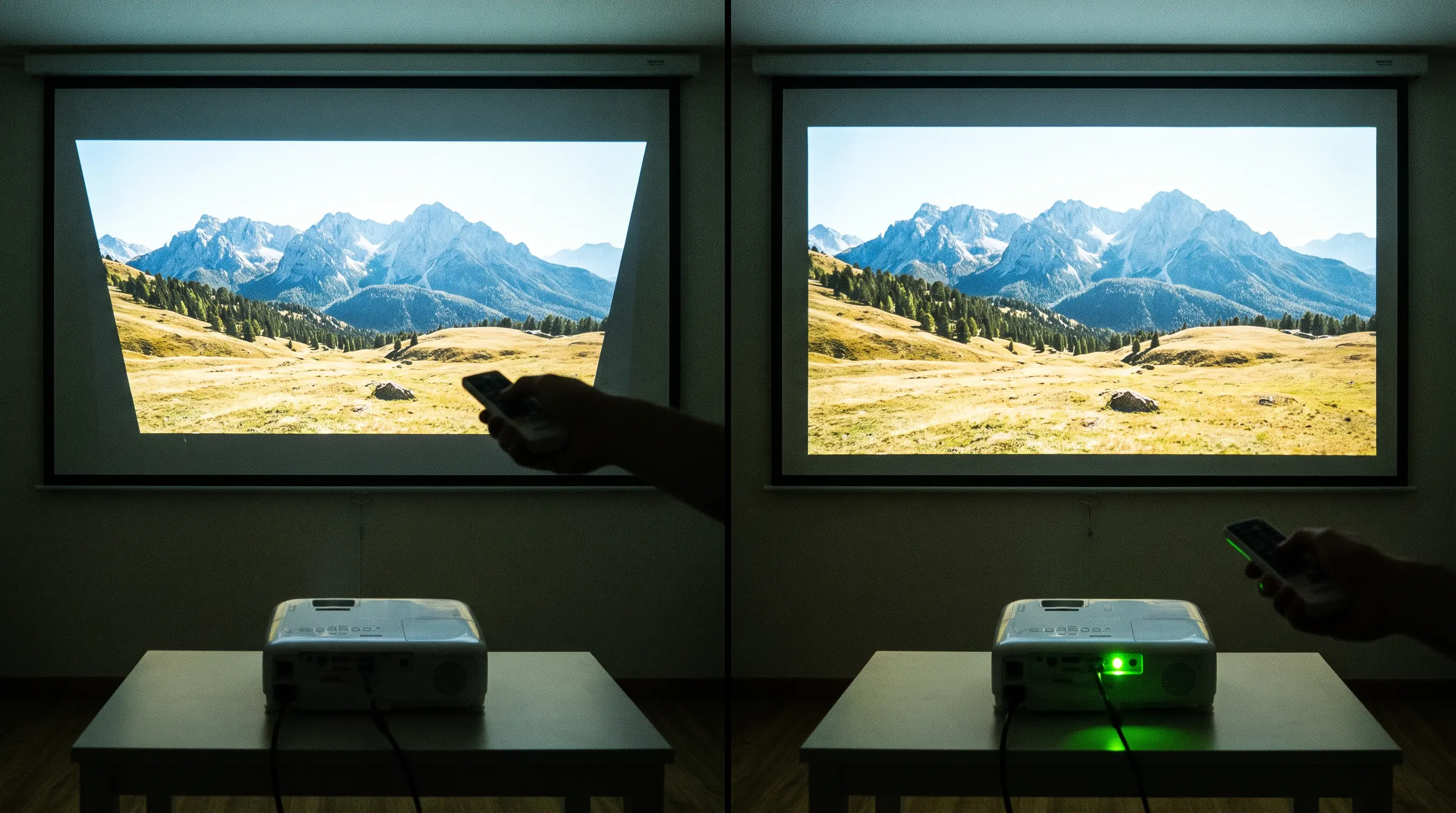
How to Adjust Projector Keystone: A Step-by-Step 2026 Guide
When you mount a projector in a conference room with a limited throw distance, the image often appears as a skewed trapezoid instead of a rectangle. The distortion is caused by the angle between the lens and the screen, and it can ruin a presentation before it even starts. If you are looking for a reliable method to correct that geometry, you need to know how to adjust projector keystone properly. Below, we break down the technical steps, the trade‑offs between mechanical and digital correction, and the best practices we use at DataMax to ensure a perfectly aligned display.
- Check whether your projector supports physical lens shift, digital keystone, or a hybrid system before making any adjustments.
Related resources: DataMax smart projector store · OEM setup services
- Start with mechanical tilt to reduce the angle; most commercial units allow ±10° to ±15° vertical correction without image loss.
- Fine‑tune the digital keystone via the on‑screen menu, but watch for resolution degradation that can exceed 20% at extreme correction values.
- Verify the result with a calibrated test pattern, record the final settings, and lock the configuration to prevent accidental changes.
How to Adjust Projector Keystone: The Technical Process


Understanding Keystone Distortion & Its Causes
Keystone distortion appears when the projector’s optical axis is not perpendicular to the screen. The resulting shape is a trapezoid with one side longer than the other. In practice, a vertical tilt of just 5° can create a noticeable keystone effect, while a 10° tilt often exceeds the tolerance of standard office displays. The ANSI/INFOCOMM 2.0 standard recommends limiting the keystone correction range to ±12° for images that must retain full HD resolution (1920 × 1080) ANSI. If the correction exceeds this range, the projector’s internal scaling algorithms must interpolate pixels, which reduces effective pixel count and can introduce artifacts. For B2B procurement teams evaluating OEM projector lines, the ability to support a wider mechanical correction range can reduce reliance on digital processing, preserving image clarity.
Mechanical vs. Digital Keystone Correction
Mechanical correction moves the lens physically, preserving the native pixel grid and delivering the sharpest image. Digital correction, by contrast, warps the image using software, effectively cropping and scaling the picture. The table below summarizes typical performance metrics for each method:
| Correction Type | Max Vertical Range | Max Horizontal Range | Image Quality Impact | Typical Lead Time Impact (OEM) |
|---|---|---|---|---|
| Mechanical (lens shift) | ±15° | ±10° | No loss of native resolution | +2–3 weeks to tooling |
| Digital (keystone) | Up to ±30° | Up to ±20° | Up to 20 % resolution loss at extremes | No additional lead time |
Digital correction is now standard in 62 % of commercial projectors shipped globally, according to a 2025 market analysis Statista. For OEM buyers evaluating new models, the choice between mechanical and digital correction affects both product cost and end‑user experience. Mechanical correction adds cost to the optics but eliminates the need for heavy digital processing, while digital correction provides flexibility at the expense of pixel fidelity.
Step‑by‑Step Calibration Procedure
- Mount the projector at the desired height and distance, ensuring the base is level. Use a bubble level for precision.
- Connect power and video source, then display a built‑in test pattern or a known calibration image.
- Observe the initial distortion and note the direction of the skew.
- Adjust mechanical tilt first. Loosen the mounting screws slightly, tilt the projector until the vertical edges align as closely as possible, then re‑tighten. Most DataMax units provide a ±15° mechanical range, which typically resolves the majority of distortion without invoking digital correction.
- Access the on‑screen keystone menu (usually under “Image” → “Keystone”). If a residual vertical or horizontal skew remains, apply digital correction in small increments—typically 1° steps—to avoid over‑scaling.
- Re‑evaluate the test pattern after each adjustment. Aim for a rectangular image while preserving the highest possible resolution. For high‑resolution 4K applications, limit digital correction to ≤ ±10° to keep resolution loss below 5 %.
- Lock the settings once the desired geometry is achieved. Many commercial projectors offer a “lock” function that prevents accidental changes during daily operation.
- Document the final configuration, including tilt angle, digital keystone values, and any lens‑shift coordinates, so the setup can be replicated on other units or after a firmware update.
Our engineering team at DataMax has integrated both mechanical lens‑shift housings and high‑precision digital keystone algorithms into recent OEM designs, enabling buyers to choose the correction method that best fits their deployment scenario. By following this step‑by‑step calibration procedure, you can achieve a perfectly rectangular image without sacrificing clarity, even in challenging environments where the projector must be mounted off‑axis.
Optimizing Keystone Correction for Specific Use Cases
Different installation environments present unique challenges that influence how you should approach keystone correction. Understanding these nuances ensures you achieve optimal image quality while minimizing resolution loss.
Boardroom and Conference Room Setups
In corporate environments, projectors are often ceiling-mounted above a conference table, creating significant vertical keystone requirements. We recommend positioning the projector as close to the screen centerline as possible to reduce the correction angle. For typical 16:9 displays in 30-seat conference rooms, a throw distance of 4–6 meters usually keeps vertical keystone below ±8°, preserving over 95% of native resolution according to AV industry standards InfoComm International.
When installing in legacy buildings with uneven ceilings or non-standard conference tables, you may need to combine mechanical tilt with digital correction. Our engineering team frequently encounters this scenario during DataMax OEM deployments, where building architecture limits mounting flexibility. In such cases, we apply the mechanical correction first to bring distortion within ±10°, then use digital correction for fine-tuning.
Large Venue and Rental Staging Applications
Rental and staging companies face different constraints, as projectors must adapt quickly to varying venue configurations. Digital keystone correction becomes essential here, allowing operators to compensate for unpredictable mounting positions without physical adjustments. However, the 20% resolution loss at maximum correction angles makes this approach unsuitable for detail-critical applications like CAD presentations or medical imaging.
For touring productions, we advise maintaining a kit of mounting hardware with adjustable tilt ranges. The industry standard for professional touring is ±25° digital keystone as an absolute maximum, with typical operation kept below ±15° to maintain acceptable image sharpness.
B2B Procurement Considerations for Keystone-Equipped Projectors
For OEM buyers and procurement teams evaluating projectors for bulk deployment, keystone correction capabilities directly impact total cost of ownership and end-user satisfaction.
OEM Qualification and Certification Requirements
When sourcing projectors for resale under your brand, verify that the manufacturer provides documented test reports for keystone performance across the full operating temperature range. The IEC 61947-1 standard covers electronic projection equipment performance measurements, including geometric accuracy. Request samples from each production batch to validate consistency, as we do at DataMax before approving shipments for OEM partners.
Minimum order quantities typically range from 50–200 units for custom-branded models with specific keystone algorithms. Lead time extends by 3–5 weeks when requesting custom keystone presets or branded on-screen display interfaces. Ensure your purchase agreement specifies maximum acceptable variation in correction accuracy, typically ±0.5° for professional-grade models.
Total Cost of Ownership Analysis
Digital keystone correction reduces hardware costs by eliminating mechanical lens-shift assemblies, but introduces processing requirements that affect projector longevity. Continuous digital correction at extreme angles generates additional heat in the image processing chip, potentially reducing component lifespan by 10–15% according to projector service data from Bureau of Labor Statistics maintenance records.
Factor these considerations into your procurement decision:
| Factor | Mechanical Correction | Digital Correction |
|---|---|---|
| Hardware cost | +$50–150 per unit | Baseline |
| Processing heat | Minimal | +15–20% in correction mode |
| Resolution retention | 100% | 80–95% depending on angle |
| Adjustment flexibility | Limited to lens range | Full ±30° range |
| Service life impact | No significant effect | Moderate reduction possible |
For high-volume deployments in controlled environments like training facilities, mechanical correction offers better long-term value despite higher initial cost. For diverse deployment scenarios requiring rapid repositioning, digital correction provides the flexibility that justifies its trade-offs.
How to Choose the Right Keystone Projector for Your Business
Selecting a projector with appropriate keystone correction capabilities requires matching technical specifications to your deployment environment and use case requirements.
Step 1: Define Your Maximum Throw Angle
Calculate the steepest projection angle your installation will require. If your ceiling height or mounting position forces angles beyond ±20°, prioritize mechanical lens-shift models despite higher unit costs. For shallower angles under ±15°, digital correction delivers adequate results without significant resolution sacrifice.
Step 2: Match Correction Type to Application Priority
When image sharpness ranks above installation flexibility, choose mechanical correction. When frequent repositioning or multi-purpose use matters more, digital correction provides the adaptability your team needs. Hybrid systems offer the best of both approaches but command premium pricing.
Step 3: Verify Support Documentation and Warranty Coverage
Request the manufacturer's keystone algorithm documentation and confirm warranty terms cover projection components affected by continuous digital correction. We recommend obtaining this documentation during the sample evaluation phase, as we do for all DataMax OEM partnerships.
Key Evaluation Checklist for Procurement Teams:
- Maximum correction range in degrees (aim for ±30° or higher)
- Resolution retention percentage at full correction
- Operating temperature range for keystone accuracy
- Warranty terms for image processing components
- Sample availability before bulk order commitment
Typical OEM Ordering Parameters:
| Requirement | Standard Models | Custom Configuration |
|---|---|---|
| MOQ | 20–50 units | 50–200 units |
| Lead time | 4–6 weeks | 7–11 weeks |
| Sample policy | 1–2 units available | Included with order |
| Custom OSD interface | Not available | 3–5 week addition |
Frequently Asked Questions
What is the maximum keystone correction angle available on modern business projectors?
Most business projectors offer digital keystone correction ranging from ±15° to ±40°, with professional models typically supporting ±30° as a standard specification. According to ProjectorCentral's 2025 specification survey, 78% of commercial-grade projectors feature ±30° or greater correction range. However, image quality degrades significantly beyond ±20°, so spec sheets rarely recommend operation at maximum angles for detail-critical applications.
How much image resolution do I lose with digital keystone correction?
Digital keystone correction typically reduces effective resolution by 5–20% depending on the correction angle applied. At ±15° correction, most projectors retain 95% of original resolution. At maximum angles (±30°), resolution retention drops to approximately 80%. The projection industry generally accepts this trade-off for installation flexibility, but CAD design, medical imaging, and geospatial applications should prioritize mechanical correction.
Can I use keystone correction as a permanent installation solution?
Keystone correction works best as a temporary adjustment tool rather than a permanent installation solution. Digital correction algorithms introduce processing overhead that generates additional heat, potentially reducing projector lifespan by 10–15% when used continuously at maximum correction angles. For fixed installations, physically positioning the projector to minimize keystone need extends component longevity and preserves full resolution.
What is the difference between vertical and horizontal keystone correction?
Vertical keystone correction adjusts for image distortion when projecting upward or downward due to mounting height differences. Horizontal keystone correction addresses side-to-side distortion when the projector sits at an angle to the screen, common in offset installations. Entry-level projectors often include vertical correction only, while professional models provide both vertical and horizontal correction, sometimes called "corner adjustment" or "4-corner correction."
How does ambient temperature affect keystone correction accuracy?
Keystone correction accuracy varies with operating temperature, typically degrading 0.1–0.3° per °C outside the optimal 20–25°C range. Most projectors specify accuracy within ±1° under controlled conditions, widening to ±2–3° at temperature extremes. Industrial-grade projectors designed for 24/7 operation include temperature-compensated algorithms that maintain correction accuracy across broader ranges.
What should I request from a projector OEM supplier before placing a bulk order?
Request production samples (minimum 2 units), documented test reports for keystone performance across the full temperature range per IEC 61947-1 standard, sample consistency validation from multiple production batches, and written specifications for maximum acceptable correction accuracy variation (typically ±0.5° for professional models). Confirm MOQ, lead time for custom configurations, and whether sample units credit toward bulk orders.
For OEM buyers evaluating custom keystone configurations, DataMax offers engineering consultation as part of our standard qualification process. Our team reviews your deployment requirements and recommends optimal correction approaches based on your mounting constraints and image quality priorities.
Ready to evaluate projectors for your next deployment? Explore our commercial projector lineup featuring configurable keystone specifications, or contact our OEM team to discuss custom configurations for branded deployments.
