
Posted At: Apr 10, 2026 - 78 Views

Android Projector Manufacturer Guide: Choosing the Right Smart Platform Partner
Choosing an android projector manufacturer is fundamentally different from choosing a traditional projector supplier. The factory must deliver not only optics, light source, and hardware reliability — but also a working Android stack, app compatibility, OTA update infrastructure, and, often, Google Mobile Services (GMS) certification. The wrong factory can deliver beautiful optics and a buggy software experience that tanks your return rate. This guide explains what separates a credible Android projector manufacturer from a hardware shop, and gives you a technical and commercial framework for choosing the right partner.
The Two Flavors of Android in Projectors
When evaluating any Android projector manufacturer, the first question is which flavor of Android they ship.
AOSP Android (Open Source)
AOSP is the base Android Open Source Project distribution. It includes the Android Runtime, the Linux kernel, and the core framework — but not Google Mobile Services. That means:
- ✅ No licensing fees
- ✅ No Google certification audit
- ✅ Your brand owns the entire software stack
- ❌ No Google Play Store
- ❌ No pre-installed Google apps (YouTube, Gmail, Maps, Drive)
- ❌ You must source or build your own app store
GMS-Certified Android (Google Licensed)
GMS certification means the projector passes Google's compatibility tests and ships with Google Play Store, YouTube, Google Assistant, Chromecast built-in, and other Google apps. This is the configuration you need if you want to:
- Sell on Amazon, Best Buy, or any retailer that requires Google Play for app parity
- Target users who expect "it just works" with their Google account
- Run Android TV launcher as the default UI
- Integrate with Cast / Miracast / AirPlay for cross-platform casting
| GMS Cost Item | Typical Range (USD) | Notes |
|---|---|---|
| GMS licensing fee | $0–$8 per unit | Tiered by volume |
| First-time compatibility audit | $5,000–$15,000 | Per device SKU |
| Annual renewal | $3,000–$8,000 | Per SKU |
| CTS / GTS test infrastructure | $2,000–$5,000 | Software toolchain |
| Pre-installed app licenses | $0.50–$3 per unit | YouTube, Maps, etc. |
SoC Platform Choices That Matter
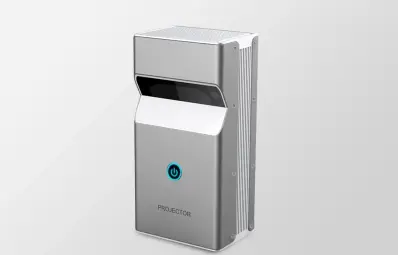
For interactive-flat-panel replacements, the DP01 UST Interactive Smart Projector with Touch Module delivers UST projection with multi-touch input at a fraction of the panel cost—an increasingly common ODM request from schools.

Buyers looking for a turnkey smart OS reference should evaluate the GP95-GTV 400 ANSI Full-Sealed Smart Projector with Google TV Built-In. Google TV is licensed and pre-integrated, eliminating months of middleware work for ODM projects.
The System-on-Chip (SoC) is the brain of your projector. It determines app performance, codec support, WiFi/BT behavior, and power consumption. The platforms we ship most often:
| SoC Platform | Manufacturer | Best For | Android Version |
|---|---|---|---|
| Amlogic T972 / T963 | Amlogic | 1080p mainstream | Android 9.0 |
| Amlogic T982 / S928 | Amlogic | 4K HDR, gaming | Android 11 / 12 |
| Amlogic A311D | Amlogic | High-end Android TV | Android 11 |
| Rockchip RK3566 / RK3588 | Rockchip | Performance + AI | Android 11 / 12 |
| Allwinner H713 / H716 | Allwinner | Cost-optimized | Android 10 / 11 |
| MediaTek MT9255 / MT9639 | MediaTek | Premium smart TV | Android 11 / 12 |
- Codec support — older Amlogic chipsets do not support AV1 hardware decode. If you want to future-proof for streaming platforms, choose SoC with AV1.
- HDR pipeline — HDR10, HLG, and Dolby Vision require both SoC support AND display pipeline tuning. Cheap platforms cut corners.
- WiFi/BT coexistence — the RF front-end matters. A factory using a sub-par WiFi module will produce units that drop connections under load.
- Long-term OS support — Amlogic and Rockchip have longer support windows than Allwinner for security patches.
App Compatibility: The Real-World Test
Spec sheets lie. App compatibility does not. When evaluating a factory, ask for these real-world tests on a sample unit:
| Test | What You Want to See |
|---|---|
| Netflix | Either native app (with Widevine L1) or reliable sideload via certified APK |
| YouTube | Native app with 4K HDR playback if 4K model |
| Prime Video | Native app with HD/4K HDR support |
| Disney+ | Native or sideload, HDR support |
| Casting | Chromecast built-in (GMS) or Miracast/AirPlay working seamlessly |
| Local media playback | 4K HEVC, 4K VP9, AV1 from USB or network share |
| Voice control | Google Assistant (GMS) or Alexa integration |
| App launch time | Cold start under 3 seconds for top-10 apps |
OTA Update Infrastructure
A projector you sell today needs firmware updates for the next 3–5 years. OTA (over-the-air) updates are not optional. Your Android projector manufacturer must provide:
- An OTA server — either the factory's own server, your branded server, or a cloud service (we use a self-hosted solution plus AWS backup)
- Delta update capability — only download changed blocks, not the whole firmware image
- Rollback safety — a bad update should not brick the unit. A/B partition updates with watchdog timer are standard.
- Regional staging — test a firmware in one market before rolling out globally
- Update cadence — security patches every 60–90 days, feature updates every 6–12 months
Custom Launcher and UI Development
Most brands launching a private-label Android projector want a custom launcher. This is where the Android projector manufacturer relationship gets deep. The deliverables typically include:
| UI Component | Customization Cost (USD) | Lead Time |
|---|---|---|
| Boot logo / splash screen | $1,500–$3,000 | 7–14 days |
| Custom wallpaper and default apps | $1,000–$2,500 | 7–14 days |
| Custom launcher (home screen layout) | $5,000–$15,000 | 21–45 days |
| Full UI redesign (TV-style launcher) | $15,000–$40,000 | 45–75 days |
| Multi-language localization | $800–$2,500 per language | 14–30 days |
| Voice assistant integration (Alexa SDK) | $3,000–$8,000 | 30–60 days |
Manufacturing and QC for Android Projectors
Android projectors have unique manufacturing concerns beyond standard optics:
- WiFi/BT antenna tuning — every housing design affects antenna performance. The factory must run OTA (over-the-air) RF tests per unit.
- Display panel calibration — color temperature, gamma, white balance — must be set per batch.
- Touch / IR remote pairing — Bluetooth remotes need pairing validation per unit.
- Codec license keys — Widevine, PlayReady, FairPlay licenses are tied to specific hardware IDs. The factory must provision these correctly.
- Pre-installed app licensing — YouTube, Netflix, and other apps have per-device license terms. Compliance matters.
Questions to Ask Before Signing a PO
Use this checklist in your next factory conversation:
- Which Android version is currently shipping on this model?
- Is this AOSP or GMS? If AOSP, what is your app store solution?
- How many firmware updates has this model received in the last 12 months?
- What is your Widevine L1 certification status?
- Can you provision our branded OTA server, or do all updates go through yours?
- Who handles GMS certification, and what is the typical lead time?
- What is the process for resolving app-specific bugs (e.g., Netflix HD not playing)?
- Can you customize the launcher UI while keeping GMS compliance?
- What is your roadmap for Android 12 / 13 / 14 support?
- Who owns the firmware source code if we part ways?
Conclusion and Next Step
An Android projector manufacturer is a software-and-hardware partner, not a hardware vendor. The right partner protects your brand reputation across thousands of customer interactions over a 3–5 year product lifetime. The wrong partner leaves you debugging app crashes and WiFi dropouts while your return rate climbs.
💼 Need an Android projector OEM/ODM partner?
Request a Free Quote | View Product Catalog
We ship both AOSP and GMS-certified Android projectors, with SoC options from Amlogic, Rockchip, and MediaTek. Sample units ship within 7–14 days, MOQ starts at 500 units for full custom firmware, and our firmware team supports you for the lifetime of the product.
