
Projectors for Golf Simulator Bays & Studios
Why golf simulator projection is different
1. Throw geometry decides the layout
Because the player occupies the space between mat and screen, an ultra-short-throw unit mounted high on the wall or ceiling keeps the light path above the swing. A standard-throw projector can work in deeper bays if the mounting line clears the player — measure before you buy.
2. Brightness against screen and room light
Impact screens scatter light and most sim bays run with some house lighting, so more ANSI lumens are needed than for a home theater of the same screen size. Light-controlled residential bays can use less; commercial studios need more.
3. Resolution for course reading
Distances, lie indicators, and course detail must stay crisp on a 100-inch-plus image, so native 1080P is the practical baseline; 4K-capable signal handling helps with modern simulator software.
4. Verify latency from the datasheet
Swing and ball-tracking software cares about input lag. Do not trust marketing words: ask for the measured input-lag figure for the exact model at the resolution and refresh rate you will run.
5. Image size and aspect ratio
Most simulator software renders in 16:9; plan the screen width, ceiling height, and floor-mat distance together so the projected rectangle fills the screen without spilling onto baffles.
6. Mounting, signal, and protection
Ceiling or high-wall mounts, protected power and HDMI runs, heat management inside a netted enclosure, and the PC or console output requirements all need planning before installation.
Which shipping models fit a simulator bay
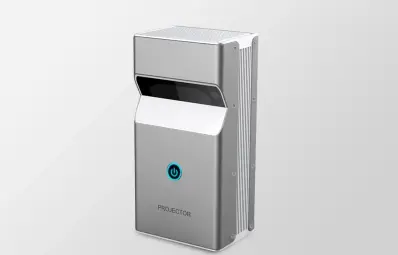
DP01 Ultra-Short-Throw Interactive
450 ANSI, native 1080P, ultra-short-throw geometry — a 100-inch image from inches off the wall, 30-200 inch range, 0.88 kg. The only current UST platform; best matched to compact, light-controlled home bays with high-wall placement.
View model
GP98 800 ANSI Smart Projector
800 ANSI (10,000-10,500 LED lumens), native 1080P, 46-300 inch image, ceiling installation supported. Note its published 1.35:1 throw ratio is standard geometry — it needs a deeper bay or ceiling line that clears the golfer; suited to light-controlled rooms needing the brightest smart unit.
View model
GP94A Android Projector
500 ANSI, native 1080P, 1.35:1 standard throw, 29-150 inch image, 2.5 kg. An entry option for light-controlled budget bays with enough depth — verify placement against your bay dimensions before ordering.
View model| Verified specification | DP01 (UST) | GP98 | GP94A |
|---|---|---|---|
| Native resolution | 1920×1080 Full HD | 1920×1080 Full HD | 1920×1080 Full HD |
| Brightness (ANSI) | 450 ANSI | 800 ANSI | 500 ANSI |
| Published throw type | Ultra-short throw | 1.35:1 standard | 1.35:1 standard |
| Image size | 30–200 in | 46–300 in | 29–150 in |
| Projection distance | Inches from the wall (UST) | 1.26–6.5 m | 1.15–6 m |
| Operating system | Android 9 | Android 9 | Android 9 |
| Weight | 0.88 kg | 2.42 kg | 2.5 kg |
| Published input-lag figure | Not published — request the measured value from engineering before buying for swing-analysis software. | ||
Building a commercial studio or a bright, high-traffic bay?
What a useful golf-sim RFQ includes
Bay dimensions
Total enclosure depth, width, and ceiling height, including the mat-to-screen distance.
Screen details
Impact screen width and height, fabric type, and whether side baffles are installed.
Planned mounting line
High wall, ceiling, or floor placement — and the clearance over the tallest golfer.
Lighting conditions
Fully light-controlled, partial ambient light, or commercial studio with full house lighting.
Software and source PC
Which simulator software you run and the HDMI output of the gaming PC or console driving it.
Quantity and channel
One home bay, multiple bays for a studio, or a distributor order for resale into the sim market.
