
Posted At: Jun 19, 2026 - 86 Views

OTA Update & Fleet Management for OEM Projectors
OTA (over-the-air) updates and fleet management are the backbone of long-term projector support. For B2B buyers, OTA update and fleet management infrastructure determines whether your projector line succeeds or fails over a 3–5 year product lifecycle. This guide explains the architecture, security, and commercial considerations for OEM buyers.

Why OTA Matters
OTA updates enable:
- Bug fixes without physical recall
- Security patches for newly discovered vulnerabilities
- Feature additions over product life
- Compliance updates (e.g., new GMS requirements)
- Performance improvements
Fleet Management Use Case

Buyers looking for a turnkey smart OS reference should evaluate the GP95-GTV 400 ANSI Full-Sealed Smart Projector with Google TV Built-In. Google TV is licensed and pre-integrated, eliminating months of middleware work for ODM projects.
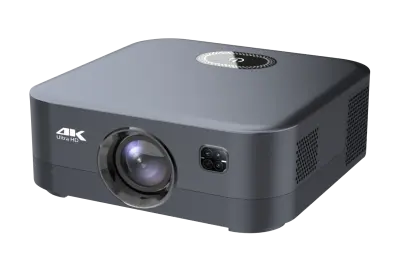
Distributors evaluating the B2B projector market can reference our GP94B 500ANSI Smart Projector for Hotels with Android 9—a production-validated platform covering 500 ANSI · Hotel-grade Android 9, suitable as an OEM/ODM starting point.
For enterprise / commercial projector deployments:
- IT team manages 100–10,000 projectors
- Need to monitor health, update firmware, troubleshoot remotely
- Centralized dashboard for visibility
- Reduces on-site service visits
- Corporate (multi-room deployments)
- Education (district-wide rollouts)
- Hospitality (chain-wide upgrades)
- Digital signage (multi-location networks)
OTA Architecture Options
Three architectures for OEM projector OTA:
Option 1: Factory-Hosted OTA
- Factory hosts firmware updates on their server
- OEM brand appears in update notifications
- Lower cost, less control
- Recommended for most consumer projects
Option 2: Branded OTA Server
- You (OEM buyer) host firmware updates
- Full control over cadence and content
- Higher cost, more responsibility
- Required for premium enterprise deployments
Option 3: Third-Party OTA Service
- Services like Mender, Balena, or UpdateHub
- Custom branding, professional infrastructure
- $500–$2,000/month
- Good for mid-volume OEM buyers
Delta Updates
For efficient OTA, delta updates are essential:
Full Update
- Complete firmware image (1–4 GB)
- Downloads every byte even if only 10% changed
- Slow on poor WiFi
- Higher data costs
Delta Update
- Only changed blocks (10–50 MB typical)
- Significantly faster
- Lower data costs
- Requires delta generation tooling
A/B Partition Updates
For safety, A/B partition updates prevent bricking:
How It Works
- Two firmware partitions (A and B)
- New firmware updates to inactive partition
- Device reboots into new partition
- If new firmware fails to boot, automatic rollback to previous partition
Requirements
- 2× storage (typically 8–16 GB eMMC)
- Bootloader support for A/B partition
- Rollback timer (e.g., 5 minutes after boot)
- Tested firmware before commit
OTA Update Cadence
Typical cadence for projector OTA:
| Update Type | Frequency | Description |
|---|---|---|
| Security patches | Monthly | Critical security fixes |
| Bug fixes | Monthly to quarterly | Non-critical issues |
| Feature updates | Annually | New features |
| Major OS upgrade | Every 18–24 months | New Android version |
| Compliance updates | As required | GMS, regulatory |
OTA Server Requirements
For OEM buyers hosting their own OTA server:
Infrastructure
- Cloud server (AWS, Azure, GCP) or on-premises
- Storage for firmware images (per firmware version, per device variant)
- HTTPS endpoints for device communication
- Database for device registry (which firmware version each device has)
Cost
- Cloud hosting: $200–$1,000/month (depending on scale)
- CDN for global delivery: $100–$500/month
- Database: $50–$300/month
- Total: $500–$2,000/month ongoing
Personnel
- Firmware engineering (for building updates)
- DevOps (for server management)
- QA (for testing updates)
OTA Security
OTA security is critical:
Signing
- Firmware signed with private with
- Device verifies signature before installing
- Prevents malicious firmware injection
Encryption
- Firmware encrypted in transit (TLS)
- Prevents man-in-the-middle attacks
- Standard for OTA implementations
Authentication
- Device authenticated to OTA server
- Prevents unauthorized firmware distribution
- Token-based or certificate-based
Rollback Protection
- Prevent rollback to old firmware (anti-rollback counter)
- Critical for security (don't allow downgrade to vulnerable version)
Fleet Management Capabilities
For enterprise fleet management:
Health Monitoring
- Power status, lamp hours, error logs
- Network connectivity, signal strength
- Temperature, fan status
- Usage patterns
Remote Control
- Power on/off
- Input switching
- Volume control
- Brightness adjustment
Configuration Management
- Default settings push
- Welcome screen update
- Network configuration
- Custom app deployment
Reporting
- Usage reports (hours per day, etc.)
- Health dashboards
- Issue alerts
- Compliance status
Remote Management Protocols
For commercial projectors, standard protocols:
PJLink
- Industry standard projector control protocol
- Power, input, status, error
- TCP/IP network
- Universal support
HTTP/HTTPS API
- RESTful API for projector control
- Authentication via token
- Modern alternative to PJLink
SNMP
- Network management protocol
- Status, alerts, configuration
- Standard for enterprise IT
Crestron RoomView / AMX / Extron
- Enterprise AV control
- Deeper integration than PJLink
- Premium feature for high-end commercial
Fleet Management Platforms
For OEM buyers, fleet management platforms:
| Platform | Features | Cost |
|---|---|---|
| Factory-provided | Basic monitoring, OTA | Included in firmware |
| AWS IoT | Full device management, OTA | $0.10–$1 per device/month |
| Azure IoT | Full device management, OTA | $0.10–$1 per device/month |
| Custom | Tailored to your needs | $5,000–$50,000 setup + $500/month |
OTA Update Workflow
A typical OTA update workflow:
- Development: factory engineers develop firmware update
- Internal testing: factory QA tests on reference units
- Beta deployment: small percentage of fleet (1–5%) gets update first
- Monitoring: monitor for issues (error rates, crash reports)
- Full rollout: expand to 25%, 50%, 100% of fleet
- Confirmation: confirm all devices updated
- Support: handle any field issues
OTA and GMS Compliance
For GMS-certified projectors, OTA has additional requirements:
- Monthly security patches (within 90 days of disclosure)
- Quarterly GMS package updates
- Annual CTS re-validation
- Major OS upgrade within 12–18 months
Common OTA Mistakes
Five pitfalls:
- No A/B partition — bad update bricks device
- No delta updates — too slow, users cancel
- No staged rollout — issue affects 100% of devices
- No rollback — bad update, no way back
- No security signing — OTA server compromised, malicious firmware
OTA for Consumer vs Enterprise
Different priorities:
| Aspect | Consumer | Enterprise |
|---|---|---|
| Update frequency | Less frequent | Frequent (security) |
| Update trigger | Manual + auto | Auto + remote trigger |
| Rollback | User-initiated | Automatic + IT-controlled |
| Fleet management | Optional | Required |
| Compliance | Light | Strict |
| Cost | Lower | Higher |
What We Recommend for OTA and Fleet Management
- Factory-hosted OTA for consumer projects (lowest cost)
- Branded OTA server for enterprise / premium projects
- Delta updates for efficiency
- A/B partitions for safety
- Firmware signing for security
- Staged rollout for risk management
- PJLink + HTTP API for commercial fleet management
Conclusion
OTA update and fleet management infrastructure is essential for projector product longevity. For OEM buyers, the right architecture depends on target market (consumer vs enterprise) and budget. Invest in delta updates, A/B partitions, and firmware signing as minimum.
💼 Need OTA update and fleet management for your projector OEM?
Request a Free Quote | View Product Catalog
We provide OTA infrastructure with delta updates, A/B partitions, and signed firmware, plus optional fleet management platform. Engineering team will recommend the right OTA architecture within 24 hours.
