
Posted At: Jun 15, 2026 - 96 Views

Projector Cooling System: Thermal Design for OEM
A projector generates 30–500W of heat depending on brightness, and effective projector cooling system design is critical for image quality, reliability, and noise. For B2B buyers, thermal management affects every aspect of the user experience — and is one of the most common sources of field failures. This guide explains the cooling system architecture, design trade-offs, and OEM specification best practices.
Why Cooling Matters
Cooling affects projector performance and reliability in multiple ways:
Image Quality
- DMD / LCD operating temperature affects performance
- Laser diodes are temperature-sensitive (wavelength shift)
- LED output drops at high temperature
- Lens focus can drift with temperature
Reliability
- 80% of projector field failures are heat-related
- Component lifespan follows Arrhenius equation (10°C increase halves life)
- Thermal cycling causes solder joint fatigue
- Fan bearings wear out
Noise
- Cooling fans are the dominant noise source
- Consumer expectations: < 30 dB at 1 meter
- Conference room: < 28 dB
- Bedroom: < 25 dB
Form Factor
- Cooling requires volume (heatsinks, fans, vents)
- Smaller projectors need more efficient cooling
- Portable projectors have least cooling margin
Heat Sources in a Projector

On the high-brightness side, the GP98 12400 Lumens Smart Projector for Meeting Rooms is our flagship reference platform for ODM partners—laser-phosphor light source with a sealed optical block.
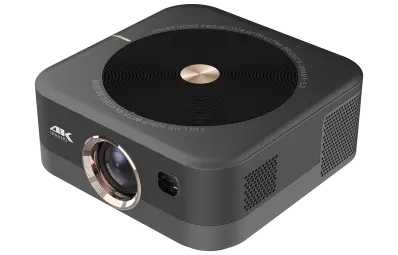
Distributors evaluating the B2B projector market can reference our GP94C Android Smart Projector for Home Theater—a production-validated platform covering Android 9 · 500 ANSI · Built-in Speakers, suitable as an OEM/ODM starting point.
Major heat sources (for a 1,000 ANSI LED projector):
| Component | Heat Output (W) | % of Total |
|---|---|---|
| LED light source | 30–60 | 30–45% |
| DMD chip | 5–10 | 5–10% |
| SoC + main board | 5–15 | 5–12% |
| Power supply | 5–10 | 5–10% |
| Other components | 5–15 | 5–12% |
| Total | 60–110 | 100% |
| Component | Heat Output (W) | % of Total |
|---|---|---|
| Laser diodes | 60–150 | 40–55% |
| Phosphor wheel | 10–20 | 5–10% |
| DMD chip | 5–10 | 3–5% |
| Other components | 10–30 | 10–15% |
| Total | 100–250 | 100% |
Cooling System Architecture
Five common cooling approaches:
1. Passive Cooling (Heat Sink Only)
- Aluminum heat sink attached to component
- Natural convection (no fan)
- Limited to low-heat components
- Used in some mini projectors
2. Active Fan Cooling (Forced Air)
- Fan moves air across heat sink
- Most common in consumer projectors
- Multiple fans for different zones (light engine, electronics)
- Variable speed based on temperature
3. Heat Pipe Cooling
- Sealed copper tube with working fluid
- Transfers heat from component to remote heat sink
- Used in high-power applications
- Passive, no moving parts
4. Liquid Cooling
- Coolant circulated through heat exchangers
- Used in some high-end home theater
- Higher cost, higher complexity
5. Combined (Heat Pipe + Fan)
- Heat pipe transfers heat to remote heat sink
- Fan cools the heat sink
- Used in premium and high-brightness projectors
Fan Selection
Three key fan parameters:
Airflow (CFM)
- Volume of air moved per minute
- Higher CFM = more cooling capacity
- Trade-off: more airflow = more noise
- Typical projector fans: 5–30 CFM
Static Pressure (Pa)
- Ability to push air through restrictive paths
- Critical for heat sink + duct systems
- Higher static pressure = more effective cooling
Bearing Type
- Sleeve bearing: cheapest, shortest life (10,000–20,000 hours)
- Ball bearing: better life (30,000–50,000 hours)
- Fluid dynamic bearing (FDB): best life (50,000–100,000 hours), quietest
Acoustic Design
Fan noise is critical:
| Noise Level | Use Case |
|---|---|
| < 25 dB | Bedroom / library |
| 25–30 dB | Living room (consumer) |
| 30–35 dB | Conference room |
| 35–40 dB | Classroom |
| > 40 dB | Unacceptable for most uses |
- Eco mode: 25–28 dB
- Standard mode: 28–32 dB
- Bright mode: 32–36 dB
Airflow Path Design
Critical for effective cooling:
Air Intake
- Located at front or sides of projector
- Filtered to prevent dust ingress
- Multiple intakes for balanced airflow
Air Path
- Direct path over hot components
- Avoids crossing noise-sensitive zones
- Separates light engine airflow from electronics
Air Exhaust
- Located at back or sides
- Heated air expelled away from user
- Avoids recirculation
Common Mistakes
- Air intake near exhaust (recirculation)
- Blocked air path (insulation, cable bundles)
- Asymmetric design (one side hot, other cold)
- No dust filtration
Dust and Filtration
Dust is the enemy of projector cooling:
- Dust on heat sinks reduces cooling efficiency
- Dust on fans unbalances them (noise, vibration)
- Dust on DMD visible as image artifacts
- Dust on light source reduces brightness
Filter Options
- Sponge filter: cheap, low efficiency
- HEPA filter: high efficiency, restrictive airflow
- Electrostatic filter: high efficiency, washable
- Sealed engine: no filter needed (best, but expensive)
Temperature Monitoring
Modern projectors include:
- Multiple NTC thermistors at critical points
- MCU monitoring with temperature-based fan speed control
- Thermal protection: automatic shutdown if too hot
- Brightness reduction: dim output when approaching thermal limits
- Temperature sensor locations
- Fan speed curves (RPM vs temperature)
- Thermal protection thresholds
- Auto brightness reduction behavior
Common Cooling Failures
Five modes of failure:
- Fan bearing failure — fan stops, projector overheats
- Heat sink dust clog — cooling degrades over time
- Thermal paste degradation — heat transfer worsens
- Vent blockage — air path blocked, hotspot develops
- Sensor failure — incorrect temperature reading, fan speed wrong
- Quality fans (FDB or quality ball bearing)
- Filtered intakes (user-replaceable)
- Quality thermal interface materials
- Proper vent design
- Redundant temperature sensors
OEM Specification Checklist
When specifying cooling in your RFQ:
COOLING SPECIFICATION
Cooling architecture: fan / heat pipe / liquid / combination
Number of fans: ____ (typically 1–3)
Fan type: sleeve / ball / FDB bearing
Fan speed control: variable (PWM or voltage)
Maximum fan noise: ____ dB at 1m
Fan rated life: ____ hours (L10)
Air intake: filtered (replaceable) / sealed
Air exhaust: location and direction
Operating temperature range: 0–____°C
Thermal protection: auto shutdown at ____°C
Brightness reduction: triggers at ____°C
Temperature sensors: locations and quantity
Cooling for high-altitude operation: ____m maximum
Acoustic treatment: dampening materials
Cooling Cost Impact
Cooling subsystem BOM:
| Component | Cost Range |
|---|---|
| Fan(s) (1–3 fans) | $2–$15 |
| Heat sink(s) | $3–$12 |
| Thermal interface material | $1–$3 |
| Ducting / shrouds | $2–$8 |
| Filters | $1–$4 |
| Temperature sensors | $0.50–$2 |
| Fan control electronics | $1–$3 |
| Total cooling subsystem | $10–$45 |
What We Recommend for Projector Cooling System OEM
- Active fan cooling for mainstream projectors
- FDB fans for premium positioning
- Variable speed control based on temperature
- Sealed engine for education / conference room SKUs
- Multiple temperature sensors with thermal protection
- Acoustic treatment for noise-sensitive applications
- Dust filtration with user-replaceable filters
Conclusion
Projector cooling system design is critical for reliability, image quality, and noise. For OEM buyers, balancing cooling capacity, fan noise, dust protection, and BOM cost requires careful engineering. Partner with factories that have thermal simulation capability and proven cooling designs.
💼 Need projector cooling system OEM guidance?
Request a Free Quote | View Product Catalog
We design cooling systems with CFD simulation, FDB fans, and sealed engine options. Engineering team will recommend the right cooling configuration for your brightness and noise targets within 24 hours.
