
Posted At: May 01, 2026 - 80 Views

Retail Display Projector Supplier: B2B Guide for Digital Signage
The retail digital signage market is shifting from flat-panel displays to projectors for certain use cases — window displays, large-format advertising, immersive brand experiences, and temporary installations. For B2B buyers, retail display projector supplier opportunities include fashion retailers, car dealerships, restaurants, hotels, and pop-up retail experiences. This guide explains what retailers need, the spec sweet spot, and how to source projectors for this segment.
The Retail Projector Market in 2026
Market dynamics:
- Annual global volume: ~400–600K units (smaller than consumer)
- Growth rate: 10–15% YoY (steady growth)
- Key use cases: window displays (40%), in-store advertising (30%), large-format signage (15%), pop-up retail (10%), event/activation (5%)
- Refresh cycle: 4–7 years (varies by use case)
- Common buyers: retail chains, shopping malls, automotive dealers, restaurants, pop-up experience designers
Why Projectors Beat TVs for Retail Signage

For entry-level home cinema projects, the GP94A Android Smart Projector for Home Theater gives distributors an Android-native reference design—lightweight, low-heat, and easy to localize under private label.
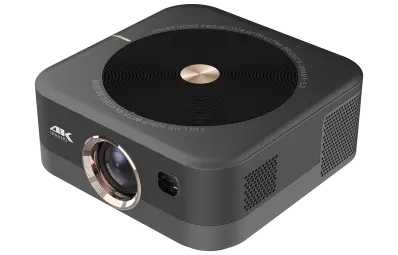
For OEM buyers building a home-theater line, our GP94C Android Smart Projector for Home Theater is a production-ready reference—500 ANSI lumen output with Android OS and built-in stereo speakers. It's a practical baseline for white-label adaptation.
In specific scenarios, projectors are superior to flat-panel displays:
- Large image size — 100"+ images from a single projector, no bezel
- Window display — projector can be hidden behind the display surface (rear projection)
- Pop-up / temporary — easier to install and remove than large displays
- Cost at large sizes — projectors scale more economically above 80"
- Aesthetic flexibility — projection onto non-flat surfaces (boxes, sculptures, mannequins)
What Retailers Want
Five buyer priorities:
- Brightness — for window displays with sunlight, in-store with overhead lights
- Reliability — must run 12+ hours daily without failure
- Content management — push content from central CMS
- Remote management — monitor fleet across multiple stores
- Aesthetic quality — bright, sharp, vibrant images
Spec Sweet Spot
For window display (front or rear projection):
| Specification | Recommended Value |
|---|---|
| Brightness | 2,500–5,000 ANSI lumens |
| Resolution | 1080p or WUXGA |
| Light source | Laser phosphor (20,000+ hour life) |
| Throw ratio | Ultra-short throw (rear projection) or short throw (front) |
| Operating system | Android or Linux with CMS app |
| Content | USB media playback, network CMS, scheduled playback |
| Connectivity | HDMI, USB, LAN, WiFi |
| Noise | <32 dB (in-store environment) |
| Warranty | 3-year onsite |
| Specification | Recommended Value |
|---|---|
| Brightness | 4,000–8,000 ANSI lumens |
| Resolution | WUXGA or 4K |
| Light source | Laser phosphor |
| Throw ratio | Short throw or standard |
| Special features | Portrait mode, edge blending, 24/7 operation |
| Connectivity | HDMI, USB, HDBaseT (long runs) |
| Cooling | Robust for 24/7 use |
UST (Ultra-Short Throw) for Window Displays
Ultra-short throw (UST) projectors are ideal for window displays because:
- The projector sits 30–60 cm from the display surface
- Rear projection allows the projector to be hidden behind the screen
- No shadow when customers walk in front of the display
- Easy to install and maintain
Content Management
Retail signage requires centralized content management:
| CMS Type | Examples | Best For |
|---|---|---|
| Standalone (USB playback) | Factory-built player | Single store, simple |
| Network CMS | BrightSign, Scala, Four Winds | Multi-store chains |
| Cloud CMS | Samsung MagicINFO, Sony Bravia | Enterprise retail |
| Custom | Buyer-built | Brand-specific needs |
- Factory-provided CMS — bundled with the projector, easier deployment, monthly fee
- Third-party CMS — works with compatible projectors, more flexibility
- Custom CMS — buyer builds their own, requires compatible API
24/7 Operation
Retail signage often runs 12–24 hours per day. Projector requirements:
- Cooling: robust for continuous operation
- Dust resistance: sealed engine preferred
- Power: stable for constant on/off cycles
- Laser phosphor preferred: instant on/off, no warm-up, 20,000+ hour life
OEM Cost Structure
| Class | FOB Cost (1,000 units) | Lead Time |
|---|---|---|
| Window display UST (3,500 ANSI, laser, UST) | $480–$780 | 45–65 days |
| In-store signage (5,000 ANSI, laser, standard) | $580–$880 | 45–65 days |
| Premium signage (8,000 ANSI, laser, edge blending) | $1,200–$2,400 | 60–90 days |
Common Retail OEM Mistakes
Five pitfalls:
- Lamp light source — short lifespan, frequent replacement
- No CMS compatibility — retailer cannot push content remotely
- Insufficient brightness — window display washed out in daylight
- Loud fan noise — in-store environment, customers hear it
- Limited mounting options — retailer cannot install in tight window display
How to Sell to Retailers
| Channel | Strengths | Weaknesses |
|---|---|---|
| Direct (retail chain HQ) | High margin, volume | Long sales cycle |
| Retail AV integrators | Technical installation, established trust | Margin sharing |
| Signage-as-a-Service providers | Recurring revenue model | Low margin on hardware |
| Industry events (NRF, IRCE) | Visibility, networking | High marketing cost |
What We Recommend for Retail Display OEM Buyers
- Target UST + laser phosphor as the core configuration
- Specify CMS compatibility (BrightSign, Scala, custom)
- Offer 3-year onsite warranty with advance replacement
- Plan for fleet management (remote monitoring, OTA updates)
- Bundle content scheduling (factory CMS or third-party)
Conclusion and Next Step
Retail display projector supplier is a niche but high-margin segment with specific requirements for brightness, longevity, and content management. Win on laser phosphor, UST options, CMS compatibility, and remote management.
💼 Need retail display projector OEM service?
Request a Free Quote | View Product Catalog
We ship retail-grade projectors with UST, laser phosphor, and CMS compatibility (BrightSign, Scala, custom). Engineering team will recommend the right configuration for your retail market within 24 hours.
