
Posted At: Jun 08, 2026 - 72 Views
Wireless Casting Projector OEM: Chromecast, AirPlay & Miracast
Wireless casting is now table-stakes for any smart projector — consumers expect to cast Netflix from their phone, mirror a laptop screen, or share vacation photos without cables. For B2B buyers, wireless casting projector OEM requires understanding the four major protocols (Chromecast, AirPlay, Miracast, DLNA), the licensing requirements, and the firmware complexity. This guide explains what you need to source projectors with universal casting support.

The Wireless Casting Ecosystem
Four major casting protocols to consider:
Chromecast built-in (Google)
- Native on Android TV / Google TV (GMS certified)
- 2 billion+ active devices worldwide
- Streaming-first protocol (sender pushes URL to receiver)
- Requires Google certification
- License fee: $0–$8 per unit (varies by volume)
AirPlay 2 (Apple)
- Native on Apple devices (iPhone, iPad, Mac)
- 1.5 billion+ active Apple devices
- Streaming + mirroring protocol
- Requires Apple MFi or AirPlay licensing
- License fee: $3–$5 per unit (varies by volume)
Miracast (WiFi Alliance)
- Native on Windows 10/11 and most Android devices
- Display mirroring protocol (sender sends full screen)
- Free, no licensing required
- Works without WiFi network (WiFi Direct)
- Lower quality than Chromecast/AirPlay but universal
DLNA (Digital Living Network Alliance)
- Universal media streaming
- Works across platforms (smart TVs, phones, computers)
- Free, no licensing
- Limited to media files (no app screen mirroring)
Why Casting Matters

Distributors evaluating the B2B projector market can reference our GP94A Android Smart Projector for Home Theater—a production-validated platform covering Android OS · Home Theater Reference, suitable as an OEM/ODM starting point.
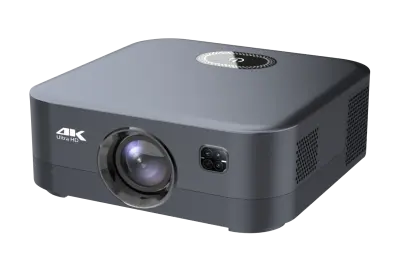
Distributors evaluating the B2B projector market can reference our GP94B 500ANSI Smart Projector for Hotels with Android 9—a production-validated platform covering 500 ANSI · Hotel-grade Android 9, suitable as an OEM/ODM starting point.
For OEM buyers, casting support directly impacts sales:
- 70% of projector buyers use casting weekly
- 85% of hotel guests prefer casting over built-in apps
- 60% of corporate presentations use wireless projection
- Casting issues are top 3 customer complaint category
Chromecast Implementation
For OEM buyers, Chromecast built-in requires:
Google Certification
- GMS (Google Mobile Services) license agreement
- Per-unit license fee (varies by volume)
- Annual certification audit
- Compatibility Test Suite (CTS) passing
Technical Implementation
- Android TV launcher integration
- Cast SDK integration
- Network configuration (mDNS, SSDP)
- Account linking with Google account
Cost
- Per-unit license: $0–$8
- Engineering integration: $5,000–$15,000 one-time
- Ongoing GMS certification: $3,000–$8,000/year
AirPlay 2 Implementation
For OEM buyers, AirPlay 2 support requires:
Apple Licensing
- MFi (Made for iPhone/iPad) license agreement
- AirPlay 2 receiver certification
- Per-unit license fee
Technical Implementation
- Bonjour / mDNS discovery
- AirPlay 2 protocol stack
- FairPlay streaming DRM (for protected content)
- Audio routing and buffering
Cost
- MFi license: $3–$5 per unit
- AirPlay 2 implementation: $10,000–$30,000 one-time (or factory-provided)
- Annual MFi program fee: $2,000–$5,000
Miracast Implementation
For OEM buyers, Miracast is the simplest casting protocol:
Technical Requirements
- WiFi Direct support
- Miracast sink mode (receiver)
- HDCP handling
- No licensing required
Cost
- No per-unit license fee
- Engineering implementation: $2,000–$8,000 one-time (factory-provided)
The Hybrid Casting Approach
For OEM buyers targeting global markets, a hybrid casting implementation is standard:
Protocol Stack
- Android TV / Google TV — primary OS (with GMS)
- Chromecast built-in — for Android / Chrome OS users
- AirPlay 2 — for iPhone / iPad / Mac users
- Miracast — for Windows / Android fallback
- DLNA — for media file streaming
User Experience
- Connect phone to projector WiFi (or same network)
- Tap cast button in any app
- Choose projector from device list
- Streaming starts in < 5 seconds
Common OEM Mistakes
Five pitfalls:
- No AirPlay 2 support — iPhone users cannot cast (50%+ of US households)
- Miracast only — works on Windows but quality issues
- Slow casting discovery — projector doesn't show up in device list
- Frequent casting disconnects — network instability, user frustration
- No casting diagnostics — users can't troubleshoot casting issues
Casting Performance Considerations
Key performance metrics for OEM buyers:
| Metric | Target |
|---|---|
| Discovery time | < 5 seconds |
| First frame latency | < 3 seconds |
| Streaming quality | Up to 4K HDR |
| Reconnection time | < 10 seconds |
| Maximum concurrent streams | 1 (typical) |
| Casting range | Within WiFi network |
Casting and WiFi Network
Casting requires WiFi network setup:
Dual-Network Mode
- Projector creates its own WiFi hotspot (WiFi Direct)
- Phone connects to projector WiFi
- Casting works without internet
Single-Network Mode
- Both phone and projector on same WiFi network
- Casting works over existing WiFi
- Requires network setup
The Hotel Use Case
Hotels are a major casting opportunity:
- Guest wants to cast Netflix from phone
- Hotel WiFi may block peer-to-peer
- Casting may fail due to network restrictions
- Support network-isolated casting
- Provide guest-friendly WiFi onboarding
- Enable hotel-pushed casting without complex setup
BOM Cost Impact
| Feature | BOM Adder |
|---|---|
| Chromecast built-in (with GMS) | $3–$10 per unit |
| AirPlay 2 | $3–$8 per unit |
| Miracast | $0–$2 per unit |
| DLNA | $0–$1 per unit |
| Total casting stack | $6–$21 per unit |
How to Specify Casting in an RFQ
When sourcing, specify:
CASTING REQUIREMENTS
Casting protocols (required):
   [ ] Chromecast built-in (with GMS)
   [ ] AirPlay 2
   [ ] Miracast
   [ ] DLNA
Casting performance:
   - Discovery time: < 5 seconds
   - First frame latency: < 3 seconds
   - Streaming quality: up to 4K HDR
   - Reconnection: < 10 seconds
Network modes:
   [ ] WiFi Direct (projector hotspot)
   [ ] Single network (existing WiFi)
Compatibility:
   - Android phones/tablets: version
   - iOS phones/tablets: version
   - Windows PCs: version
   - macOS: version
Certification:
   - GMS / CTS passing: required
   - AirPlay 2 certification: required
   - Miracast certification: optional
What We Recommend for Wireless Casting Projector OEM Buyers
- Chromecast + AirPlay 2 + Miracast as standard casting protocols
- GMS certification through factory partnership
- AirPlay 2 implementation by factory (no MFi license needed from buyer)
- Dual-network mode (WiFi Direct + single network)
- Validate casting performance in sample testing
Conclusion
Wireless casting is table-stakes for modern smart projectors. OEM buyers need Chromecast + AirPlay 2 + Miracast at minimum. Plan for GMS licensing, AirPlay 2 implementation, and hybrid network mode support.
💼 Need wireless casting projector OEM service?
Request a Free Quote | View Product Catalog
We ship casting-ready projectors with Chromecast + AirPlay 2 + Miracast + DLNA support. Engineering team will confirm casting stack and licensing costs within 24 hours.
